
AgentHub
One tab. Every tool. Powered by AI.
The call-centre productivity hub that collapses a dozen CRMs, portals, and knowledge bases into a single dashboard — organised the way agents actually work. The free core covers the whole shift; the paid AI Agent answers from company-approved sources only.
Core suite is free forever · AI Agent unlocked per-deployment via SUK. See pricing →
Live surface
See it, in motion.
Real panels from the running app — the three-column tool hub, the AI Agent with source citations, the theme picker, the one-click boot-up. Hover the canvas; it tilts with you.
Tool hub
AI Agent · source-cited
14 themes · live
Boot Up My Day
Why it exists
Call-centre tab fatigue,
collapsed into one HUD.
Every shift, an agent juggles a CRM, a knowledge base, two scheduling tools, an internal portal, a couple of dashboards, and a chat client. Every tab switch is cognitive load. Every search is a context break. Every "let me put you on hold" is a tiny customer disappointment.
AgentHub puts the entire shift in one place — organised by Start of Day, Main Day, End of Day. Boot the whole stack with one click. Hot-swap themes to match the client. Hand a share-code to a new starter and their workspace is identical to a veteran's within seconds.
And when an agent needs an answer mid-call, the AI pulls it straight from company-approved sources — never redirecting them to a website while a customer waits.
What you can do
Real shift workflows, not chat-toy demos.
- ✦Drop every shift tool into one tab — no more 14-tab CRM circus.
- ✦Hand a new starter a share link and their entire workspace appears.
- ✦Paste a Lighthouse URL — the AI answers questions from that page only.
- ✦Run the bookmarklet on an internal intranet page; the AI reads it on the next question.
- ✦Brand-match per client — Concentrix cyan one shift, in-house purple the next.
- ✦Boot Up My Day at 9am, End of Day at 5pm. One button each.
- ✦Drop a 30-page PDF policy into sources; agents query it during live calls instead of redirecting.
- ✦Revoke a client's SUK from Vercel — access dies before the next refresh.
What's in the box
Nine pillars.
Custom tool hub
Three columns: Start of Day, Main Day, End of Day. Drag, rename, reorder. Add any URL — auto-fetched favicon, one-click open.
Boot Up My Day
One button opens every Start-of-Day and Main-Day tool in fresh tabs. Skip End-of-Day so the morning browser stays sane.
AI Agent panel
Floating Claude chat with real-time streaming. Add company URLs as sources — answers come from that content only. Cited at the end.
Bookmarklet capture
One-click capture of any internal page the agent is already logged into. Lighthouse, intranet, anything behind a VPN. PDFs auto-included.
SUK access gate
AI is unlocked per client by a System Unlock Key. Validated server-side. Revoke a key in Vercel and access dies instantly — no redeploy.
14 colour themes
Live theme switching. Brand-match per client — Concentrix cyan, your in-house palette, or roll a custom hue.
Shift scheduler
Rolling 7-day real-date calendar with reminders, follow-ups, and per-day tasks. Notes panel auto-saves every keystroke.
Share & backup
Export your full setup as a compressed code, or a short link. Restore on any machine — instant onboarding for new starters.
No database, no logins
Agent data lives in their browser. AI calls proxy through serverless. No accounts, no analytics, no tracking. HTTPS everywhere.
How the AI Agent works
Six steps to grounded answers.
No vector DB. No fine-tune. Just sources you control, fetched at query time and discarded. Every answer cites its URL.
Click the 🤖 button
Floating in the corner of the dashboard. Opens the AI Agent panel — instant, no page navigation.
Enter the SUK
Server validates the System Unlock Key on every request. No key, no panel — no AI traffic.
Add company sources
Paste a knowledge-base URL via 🔗. Add a whole site root for whole-domain search. The AI fetches at query time, never stores.
Capture private pages
For Lighthouse / intranet, install the one-click bookmarklet. Run it on any page you're already logged into — content + PDFs land in the clipboard.
Ask the question
Streams in real time with a live "Searching sources…" pill. Structured for live calls — never redirects to a website.
Cite & repeat
Every source-based answer ends with the URL it came from. History persists across sessions per agent.
Up close
The details
that earn the shift.
Real UI surfaces from the running app — each one tilts as you scroll.
Tool hub
Three columns. Every tool.
Drag, rename, reorder. Favicons auto-fetched. The agent's whole shift, mapped.
Boot up
One button. Every tab.
Opens every SOD + MD tool simultaneously. Skips EOD so morning boot doesn't flood the browser.
AI Agent
Answers from your sources only.
Floating Claude chat. Add company URLs as sources — answers come from that content, cited at the end.
Themes
Brand-match per client.
14 palettes ship with the app. Cyan for Concentrix, purple for in-house, anything in between.
Real deployments
Same hub, every shift.
Four screenshots from the actual app — empty, dev workflow, creator workflow, and annotated. Click any to view full size.
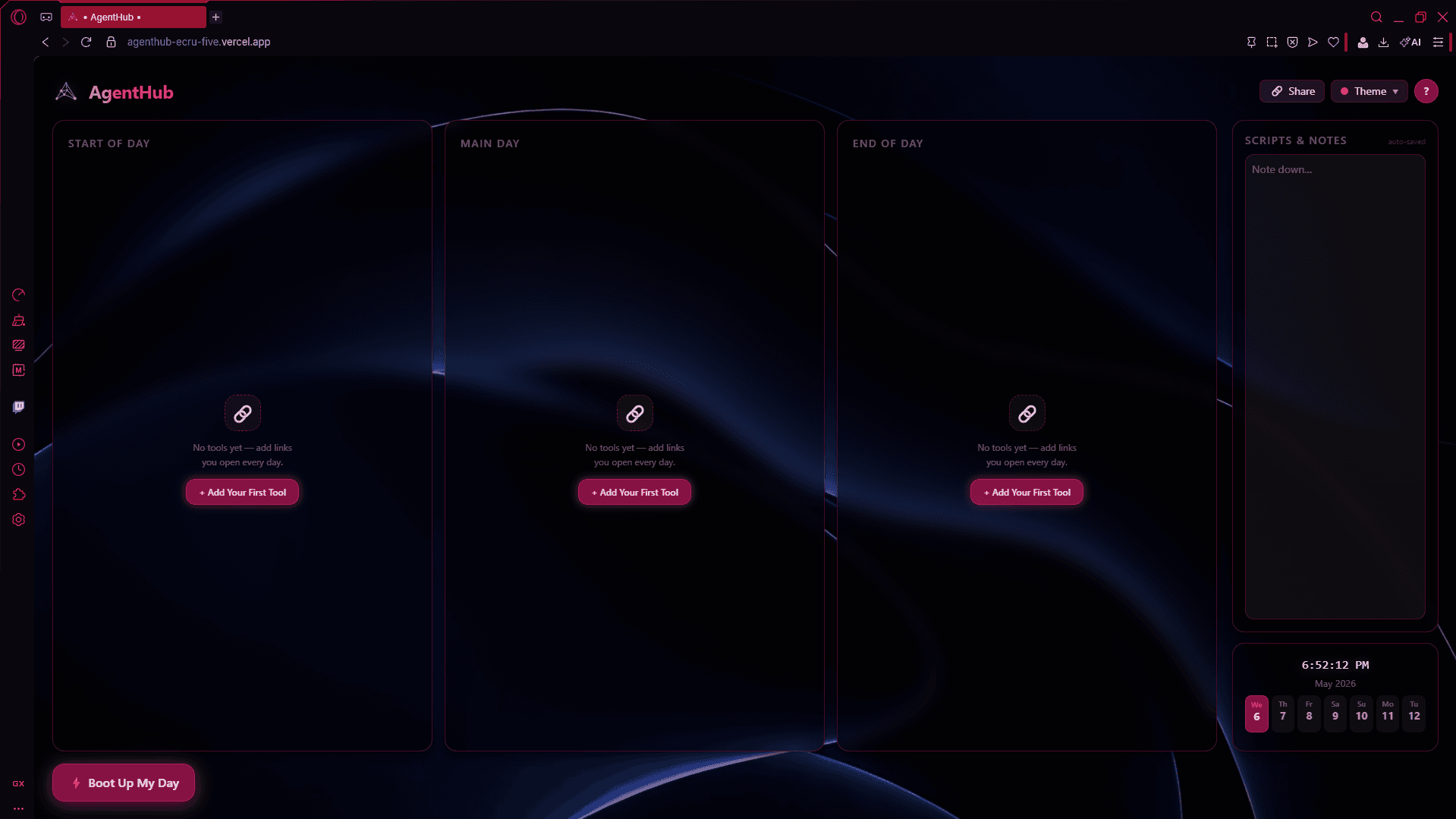 Clean HUD
A fresh deployment.
Three empty columns waiting for the workflow. Crimson theme — one of 14 brand options.
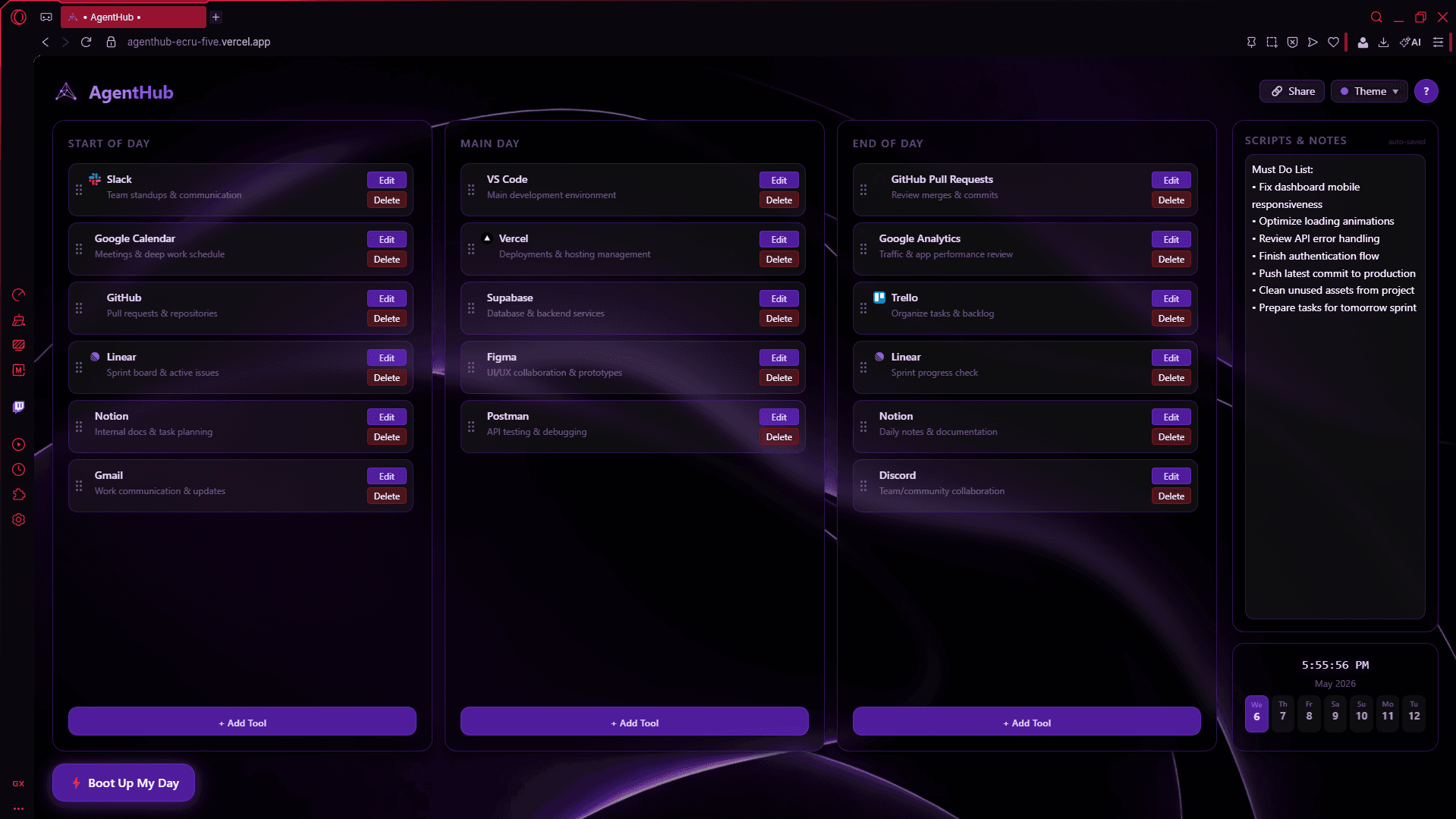 Developer shift
A working day for an engineer.
Slack, Calendar, GitHub on the left. Code, Vercel, Supabase mid-shift. PRs and analytics at end-of-day.
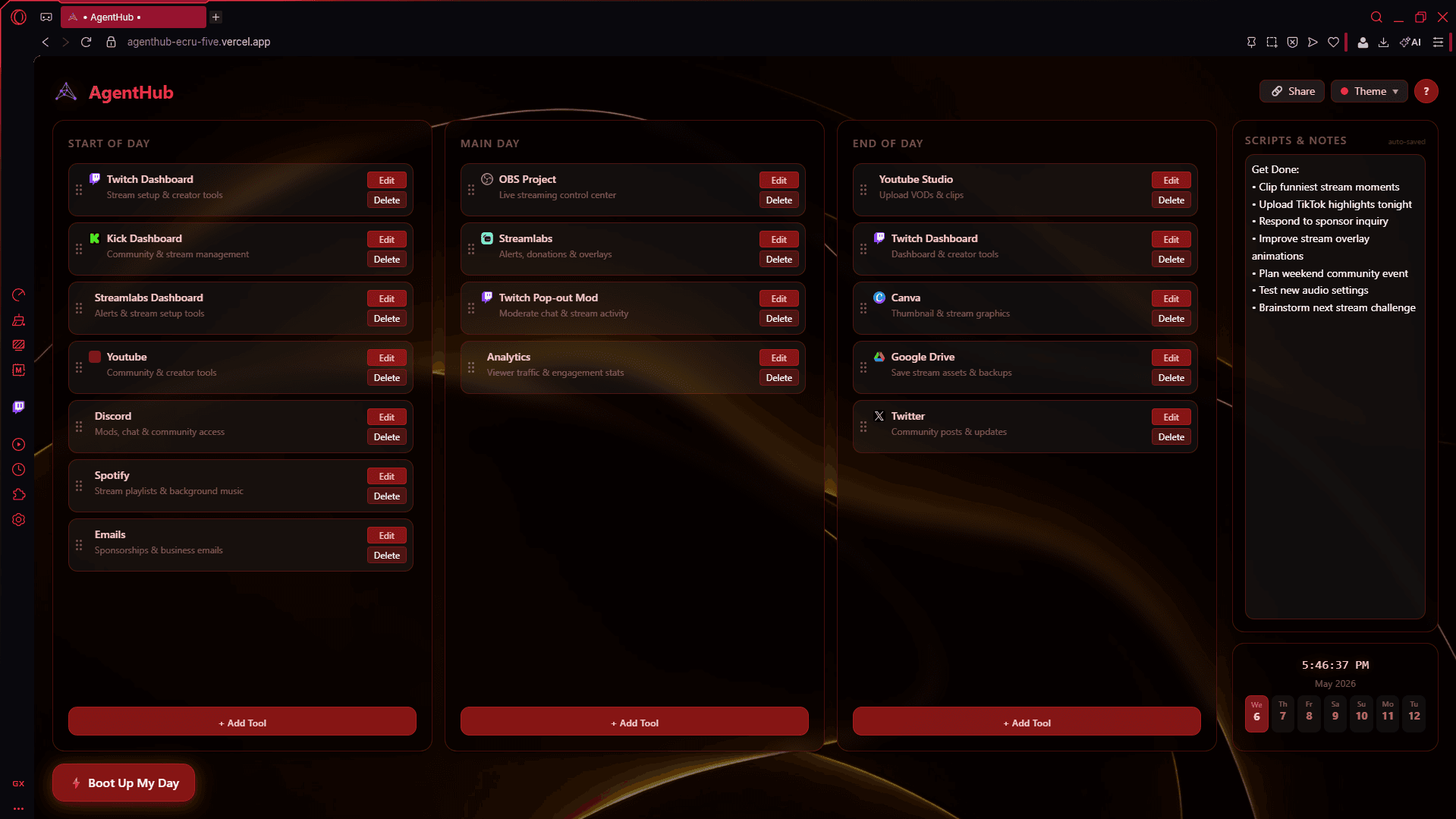 Creator shift
A working day for a streamer.
Twitch + Kick boot-up. Stream tools mid-day. YouTube uploads + Discord wrap-up. Same hub, totally different shape.
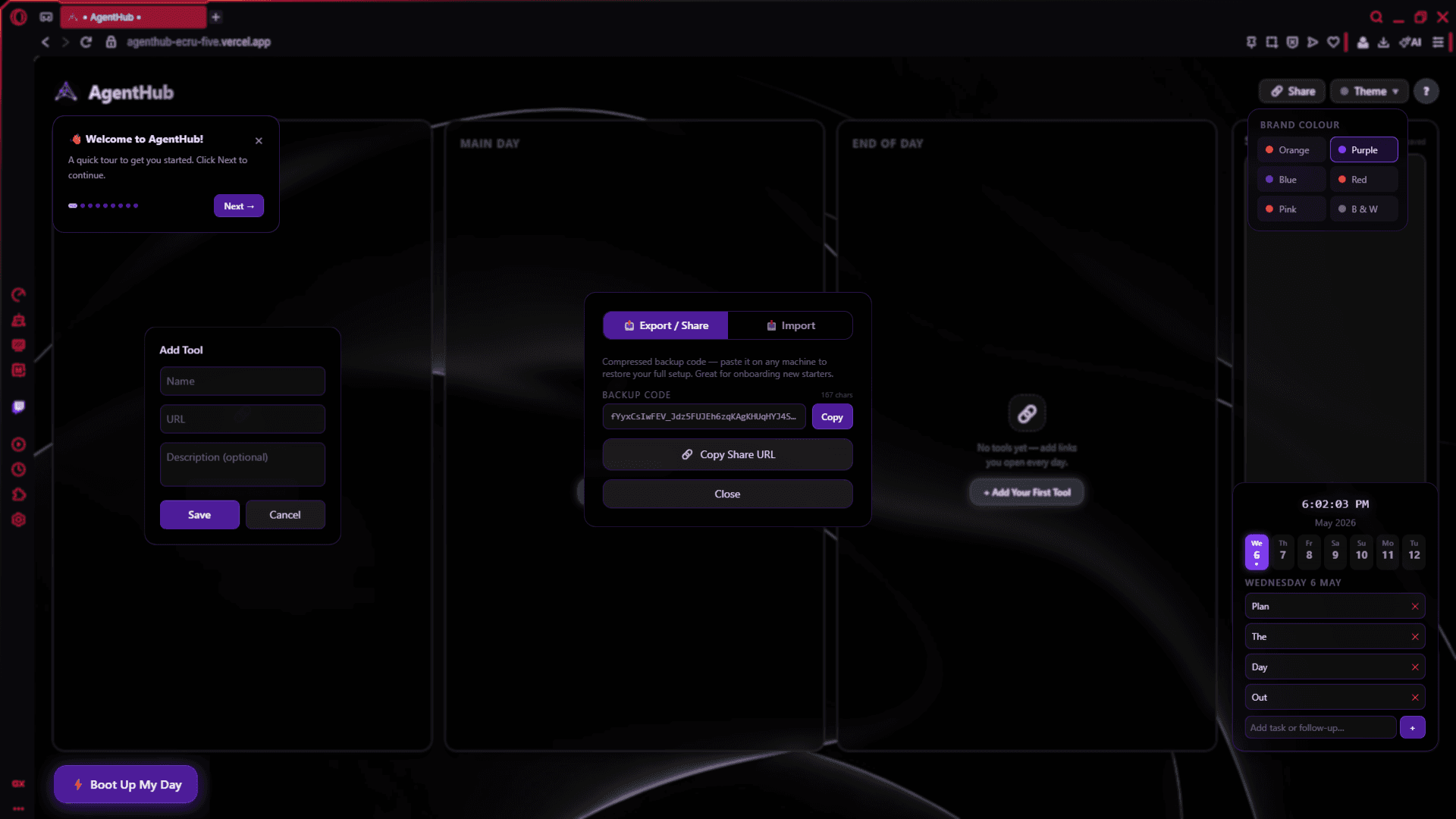 Annotated
Everything called out.
Tour mode + add-tool dialog + share/export overlay + theme picker — the full UI surface in one shot.
Hosting · security · IT
Nothing to
install or audit.
Runs entirely in the browser. No servers to manage. No database. No logins. No analytics. No tracking. Vercel hosts the static app + serverless API; Anthropic powers the AI; Jina Reader briefly fetches URLs at query time.
Keys live in Vercel env vars
The Anthropic API key never reaches the browser. AI calls proxy through a serverless function — the only thing the client sees is the streamed answer.
No database, no logins
Tools, notes, schedule, sources — all in the agent's own browser localStorage. Nothing stored server-side, nothing to leak.
SUK-gated access
System Unlock Key validated server-side on every AI request. Revoke from Vercel and access dies before the next refresh — no redeploy.
No telemetry, no tracking
No usage analytics, no crash reporters, no third-party SDKs. Anthropic does not use API data for training by default.
Permissions, by surface
Browser storage
Tools, notes, schedule, sources — all in localStorage
Clipboard
Bookmarklet capture + share-code paste
Claude API (server)
AI answers — proxied, key never in browser
Jina Reader (server)
Public-URL source fetching at query time
SUK validation
Server-side gate on every AI call
Outbound HTTPS
Only to Anthropic + Jina, never elsewhere
Full IT brief — hosting, dependencies, audit posture, and FAQ — lives in the README's Hosting & Security section.
Pricing
Core free. AI by seat tier.
Full productivity suite is free forever. AI Agent is billed monthly per deployment based on how many users you're unlocking.
Free Forever
Live · no signup$0
Full productivity suite. No accounts, no setup, no card.
- ✓Custom tool hub · 3 columns
- ✓Boot Up My Day
- ✓Shift scheduler · notes
- ✓Share & backup codes
- ✓14 colour themes
- ✓Guided tour
AI Agent · paid
Start solo, scale to call-centre teams.
Trying it out before pitching to your team? Single seat with the full AI Agent — upgrade to a team tier any time.
Starter
$50–100/mo
Up to 10 users
- ✦AI Agent panel · Claude
- ✦Source URLs · whole-site search
- ✦Bookmarklet + PDF capture
- ✦SUK access control
Growth
$125–200/mo
Up to 25 users
- ✦AI Agent panel · Claude
- ✦Source URLs · whole-site search
- ✦Bookmarklet + PDF capture
- ✦SUK access control
Business
$250–400/mo
Up to 50 users
- ✦AI Agent panel · Claude
- ✦Source URLs · whole-site search
- ✦Bookmarklet + PDF capture
- ✦SUK access control
Enterprise
$500–1,000/mo
Up to 100 users
- ✦AI Agent panel · Claude
- ✦Source URLs · whole-site search
- ✦Bookmarklet + PDF capture
- ✦SUK access control
All prices indicative · per deployment, per month. Custom enterprise agreements and volume discounts available. Full pricing →
One tab. Every tool.
Free forever for the core hub. AI Agent unlocked per deployment. No accounts, no setup, no servers. Just open the URL and go.